We can’t bring taste(1) in your design. But we can do it in your code.
"We know more than we can tell." (2) about the tacit dimension of human skill - the knowledge that lives in a pianist's hands and a diagnostician's glance, real knowledge that cannot survive translation into description.
Every prompt box on the internet is a wager against that sentence: a bet that whatever matters about the thing you want can be said.
Faster, Agent first.
So the question of the decade is what authorship consists of (3), once production is free.
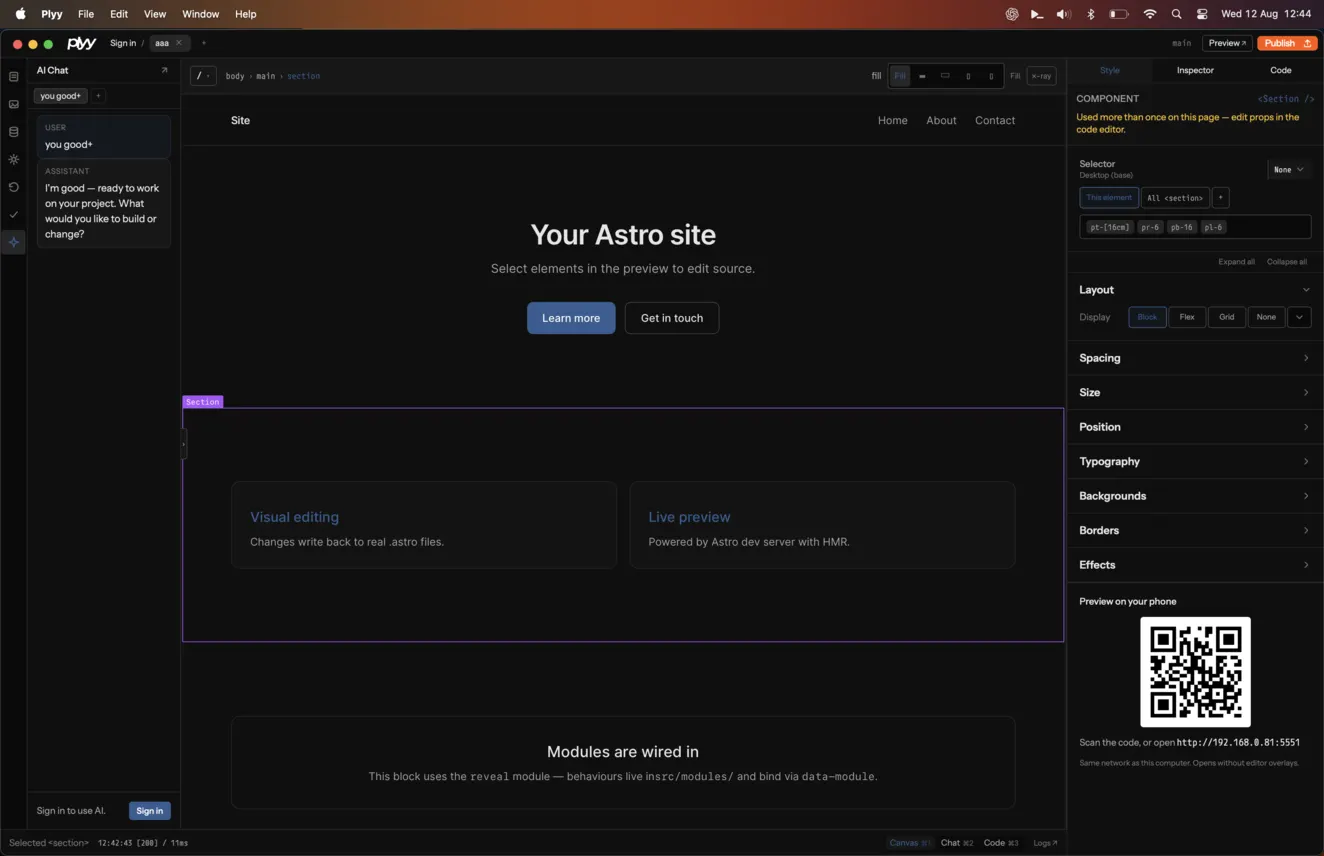
Select the element you can see, then change layout, type, spacing, color, and source without rebuilding the page elsewhere.
Watch video demo.
Plyy works against project files on your machine, so Git, your editor, and the browser remain part of the workflow.
Agent-first, without losing control.
Watch video demo.
Ask for a broad change, inspect it in the live canvas, and keep directing the work with visual context.
The agent can read and change the project while you stay close to the rendered result and the underlying code.
002
003
A harness for the full loop.
Create or clone a project, run it, edit it, preview it on another device, and publish from one workspace.
Project tabs preserve context while the editor coordinates the Astro dev server, visual bridge, agent, and publish flow.
Watch video demo.
Responsive by inspection.
Move between desktop, tablet, and mobile canvases with an explicit viewport instead of guessing from a single screenshot.
Watch video demo.
Breakpoint-aware controls keep the selected element and its current responsive context visible while you work.
Publish a shareable preview.
Watch video demo.
Turn the current project into a hosted Plyy site when you are ready to share it.
Private beta targets the managed {slug}.plyy.dev flow, with preview branches available on paid plans.
Keep projects close.
Organize remembered local and cloned projects into folders, then reopen them without browsing the filesystem each time.
Plyy remembers projects created on this machine or opened from a remote Git URL; it does not indiscriminately list your GitHub repositories.
Watch video demo.
FAQs
The launch questions that matter: project ownership, supported workflows, data handling, and what the beta costs.
Does Plyy edit my real project files?
Yes. Plyy opens an Astro project on your Mac and writes changes back to the source files you already own.
The visual canvas is a live development preview, so you can inspect the result while keeping Git and your normal editor in the loop.
Commit or back up important work before making broad AI-assisted changes.
Which projects can I open?
Private beta is focused on Astro projects. You can create a Plyy starter, open an existing local project, or clone a project from a Git remote URL.
Plain and motion starters are supported, with the editor bridge added to the running Astro preview.
Other frameworks are not part of the private-beta support target.
What leaves my computer when I use AI?
Your project remains on your machine. When you ask the agent to work, the request and relevant project context are sent to Plyy’s AI service to produce the response.
Publishing is a separate action: only the site output you choose to publish is uploaded to the Plyy hosting service.
See the Privacy page for the current data-handling terms.
Can I try it without paying?
Yes. The Free plan includes 75 AI credits each month, one published site, and the default AI model.
Paid plans add more monthly credits, published sites, preview branches, and model selection. Plans are managed from your Plyy account.
Private beta is currently distributed as a signed macOS app.
Swipe through the system’s core capabilities. Each card rearranges the same reusable content blocks.
001
Edit the real Astro project.
Select the element you can see, then change layout, type, spacing, color, and source without rebuilding the page elsewhere.
Watch video demo.
Plyy works against project files on your machine, so Git, your editor, and the browser remain part of the workflow.
Agent-first, without losing control.
Watch video demo.
Ask for a broad change, inspect it in the live canvas, and keep directing the work with visual context.
The agent can read and change the project while you stay close to the rendered result and the underlying code.
002
003
A harness for the full loop.
Create or clone a project, run it, edit it, preview it on another device, and publish from one workspace.
Project tabs preserve context while the editor coordinates the Astro dev server, visual bridge, agent, and publish flow.
Watch video demo.
Responsive by inspection.
Move between desktop, tablet, and mobile canvases with an explicit viewport instead of guessing from a single screenshot.
Watch video demo.
Breakpoint-aware controls keep the selected element and its current responsive context visible while you work.
Publish a shareable preview.
Watch video demo.
Turn the current project into a hosted Plyy site when you are ready to share it.
Private beta targets the managed {slug}.plyy.dev flow, with preview branches available on paid plans.
Keep projects close.
Organize remembered local and cloned projects into folders, then reopen them without browsing the filesystem each time.
Plyy remembers projects created on this machine or opened from a remote Git URL; it does not indiscriminately list your GitHub repositories.
FAQs
Questions, answered.
Does Plyy edit my real project files?
Yes. Plyy opens an Astro project on your Mac and writes changes back to the source files you already own.
The visual canvas is a live development preview, so you can inspect the result while keeping Git and your normal editor in the loop.
Commit or back up important work before making broad AI-assisted changes.
Which projects can I open?
Private beta is focused on Astro projects. You can create a Plyy starter, open an existing local project, or clone a project from a Git remote URL.
Plain and motion starters are supported, with the editor bridge added to the running Astro preview.
Other frameworks are not part of the private-beta support target.
What leaves my computer when I use AI?
Your project remains on your machine. When you ask the agent to work, the request and relevant project context are sent to Plyy’s AI service to produce the response.
Publishing is a separate action: only the site output you choose to publish is uploaded to the Plyy hosting service.
See the Privacy page for the current data-handling terms.
Can I try it without paying?
Yes. The Free plan includes 75 AI credits each month, one published site, and the default AI model.
Paid plans add more monthly credits, published sites, preview branches, and model selection. Plans are managed from your Plyy account.
Private beta is currently distributed as a signed macOS app.
Pricing
Choose the pace that fits.
Plans are purchased directly inside the app.
Free
$0/month
Build locally, use the default AI model, and publish one site.